FlightQ

Run your flying school on autopilot.

FlightQ plans the day, re-books what gets cancelled, writes the logbook from every sign-off and prices every hour flown. Cadets, instructors, dispatchers and schedulers all work from the same record, each seeing their own part of it. You stay pilot in command: nothing goes live until you publish it.

The FlightQ control centre on a Monday from 06:00 to 21:00, auto-filled with 32 sorties across five aircraft and a simulator, 63 flight hours and 82% fleet use, all published

Monday

  1. 32 sorties planned · 63 hours
  2. No clashes: aircraft, crew, cadets
  3. Next mission per cadet, repeats first
  4. Cancellations re-booked in 14 days
  5. Balance checked before bookingSoon
  6. Nothing live until you publish
Built with flying schools

A dozen+ flying schools across six countries shaped what FlightQ does.

FlightQ didn't start with software engineers. It started with the owners and chief flight instructors of these schools, and the gaps they live with because today's tools weren't built for how a flying school runs now. Every part of FlightQ answers one of those gaps.

The challenge

Every morning, a flying school balances aircraft, instructors, cadets, weather and cash.

A tail goes tech and three sorties need a new aircraft. An instructor calls in sick and a checkride slips a week. A front rolls in and the afternoon is gone. Every change ripples into the rest of the day, the cadet's progress and the month's billing, and most of it lands on one desk before 7 a.m.

Illustration · one morning at a flying school

Auto-scheduling

Auto-schedule the whole day in one click.
Tuned for aircraft utilisation, student progress, or a balance of both.

FlightQ builds the day from each cadet's next mission, the aircraft it needs and the instructors who are free. Pick the mode, and it plans around it.

Tuesday · auto-schedule 21 sorties planned

Where each cadet stands in the syllabus before today today

83%fleet use
21sorties
11missions between first and last cadet

Every aircraft flown to its daily target. The leaders pull further ahead.

Illustration · the same day, planned three ways

Aircraft utilisation

Every aircraft flown to its daily target.

Student progress

The batch moves together. Nobody gets ahead until the others catch up.

Balanced

Aircraft kept busy, with a limit on how far any cadet can lead.

One record, every role

Everyone gets their own FlightQ.
And sees only what their role needs.

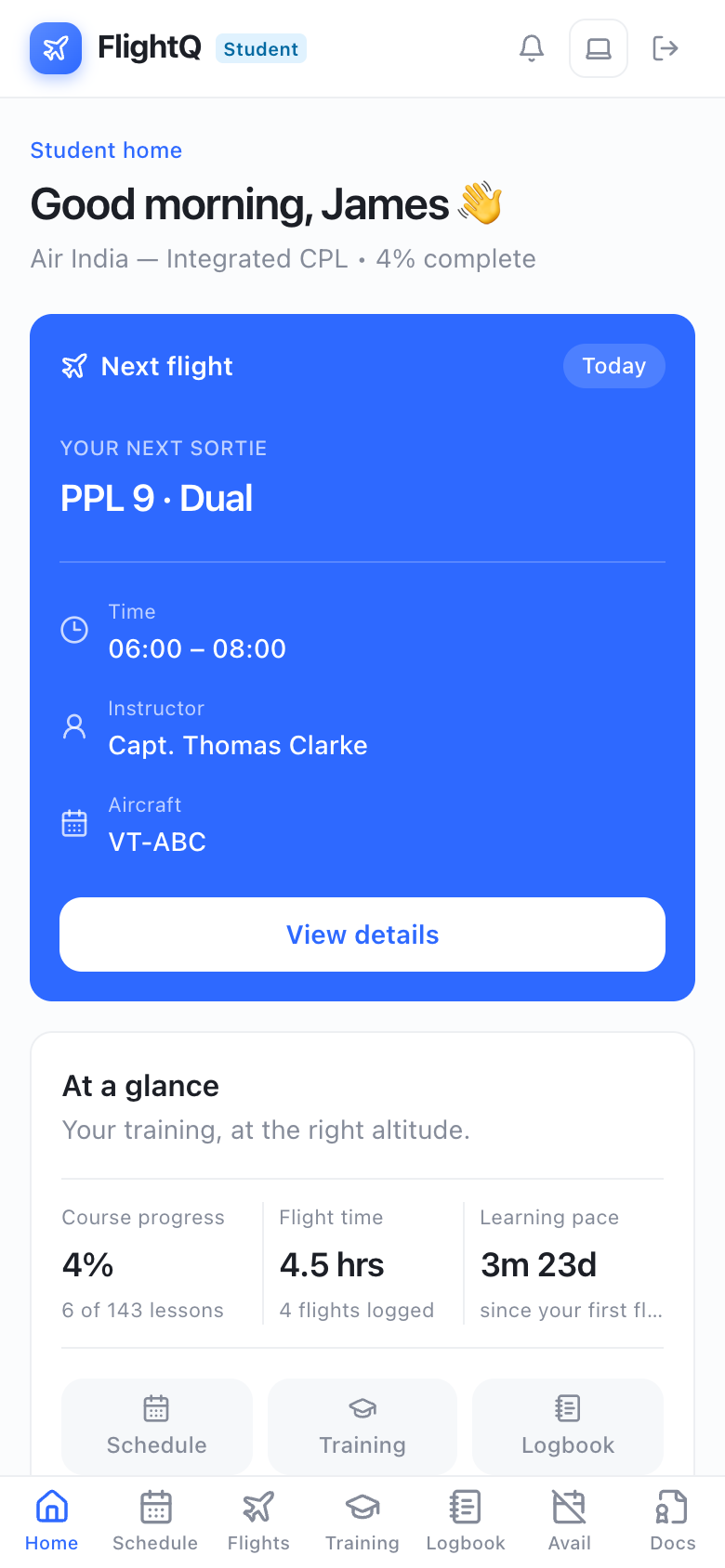
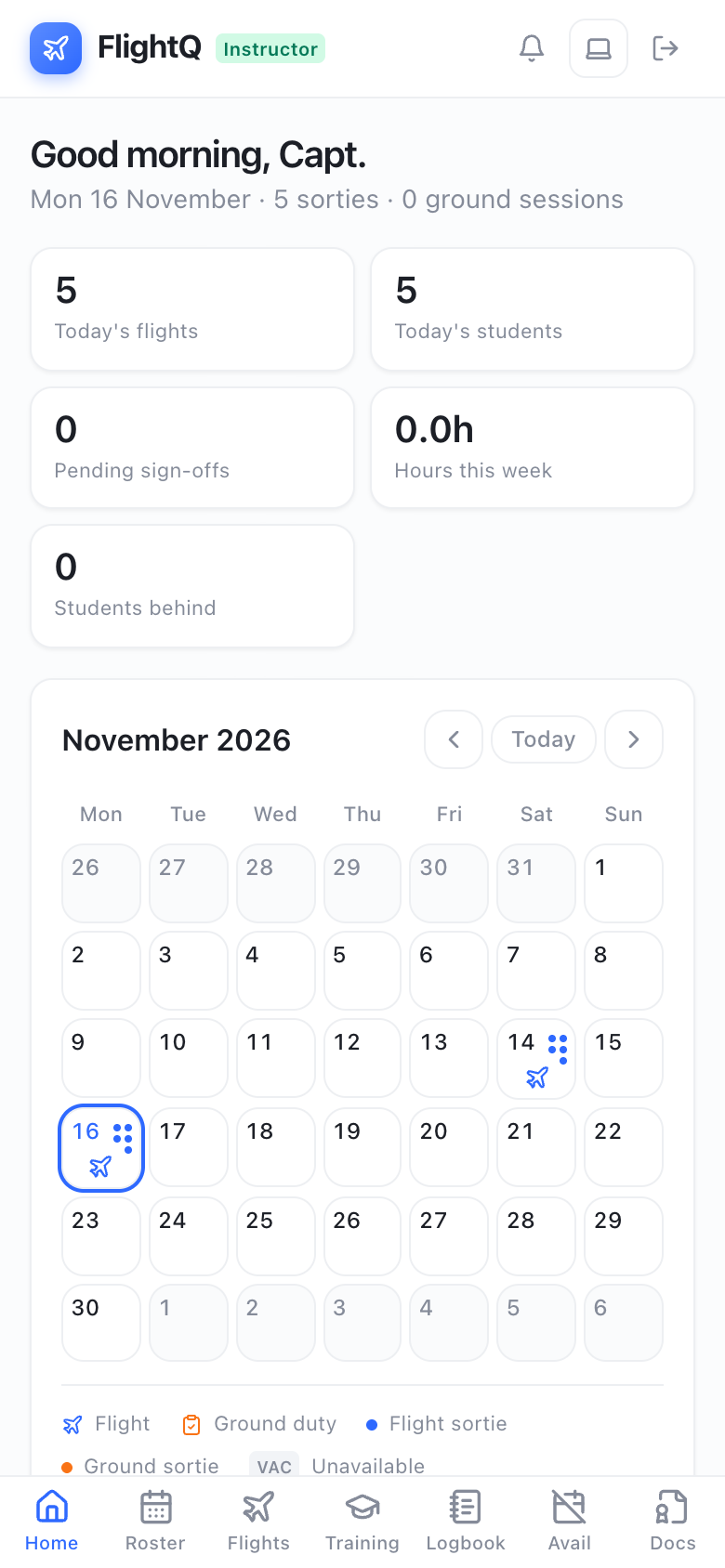
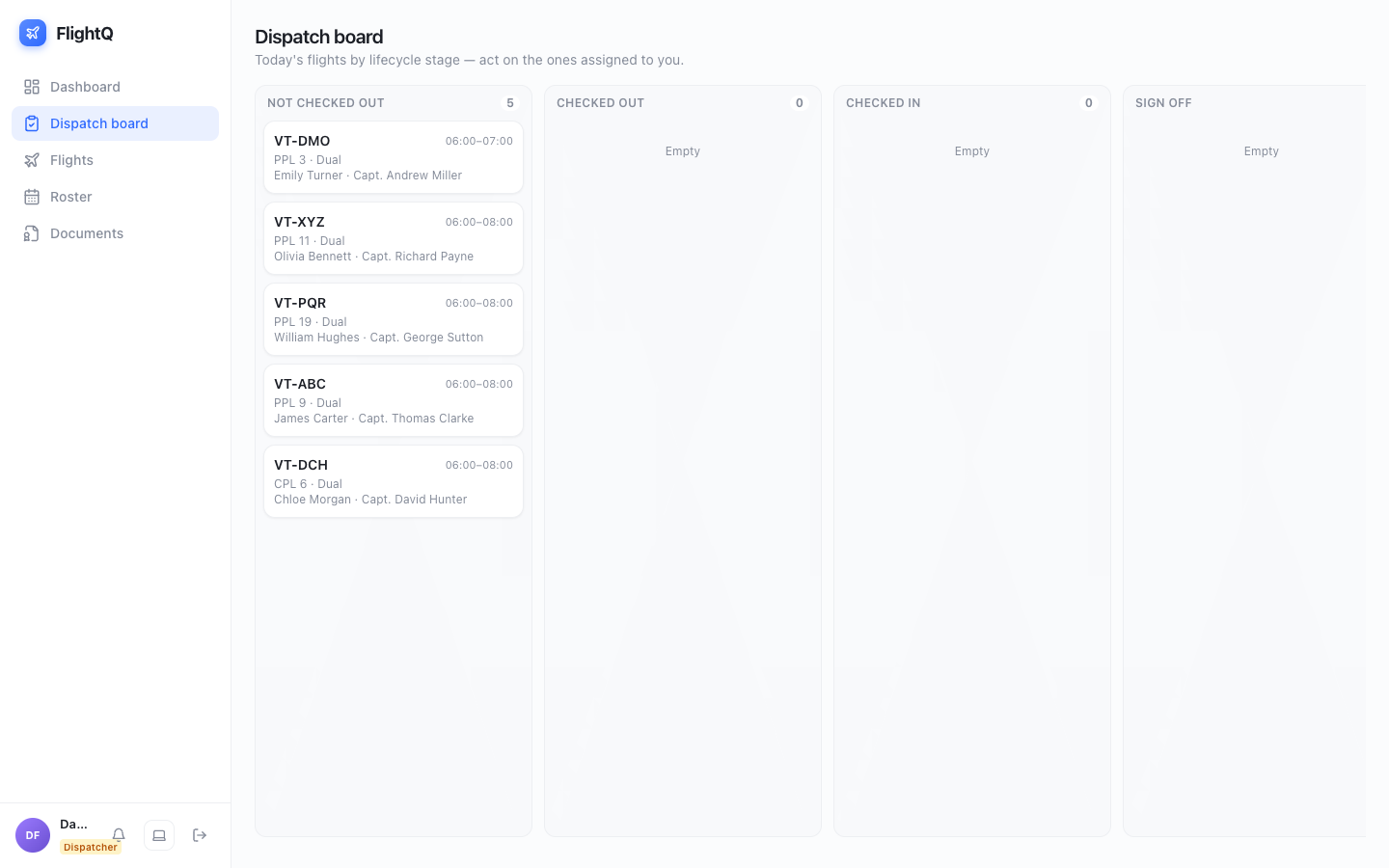
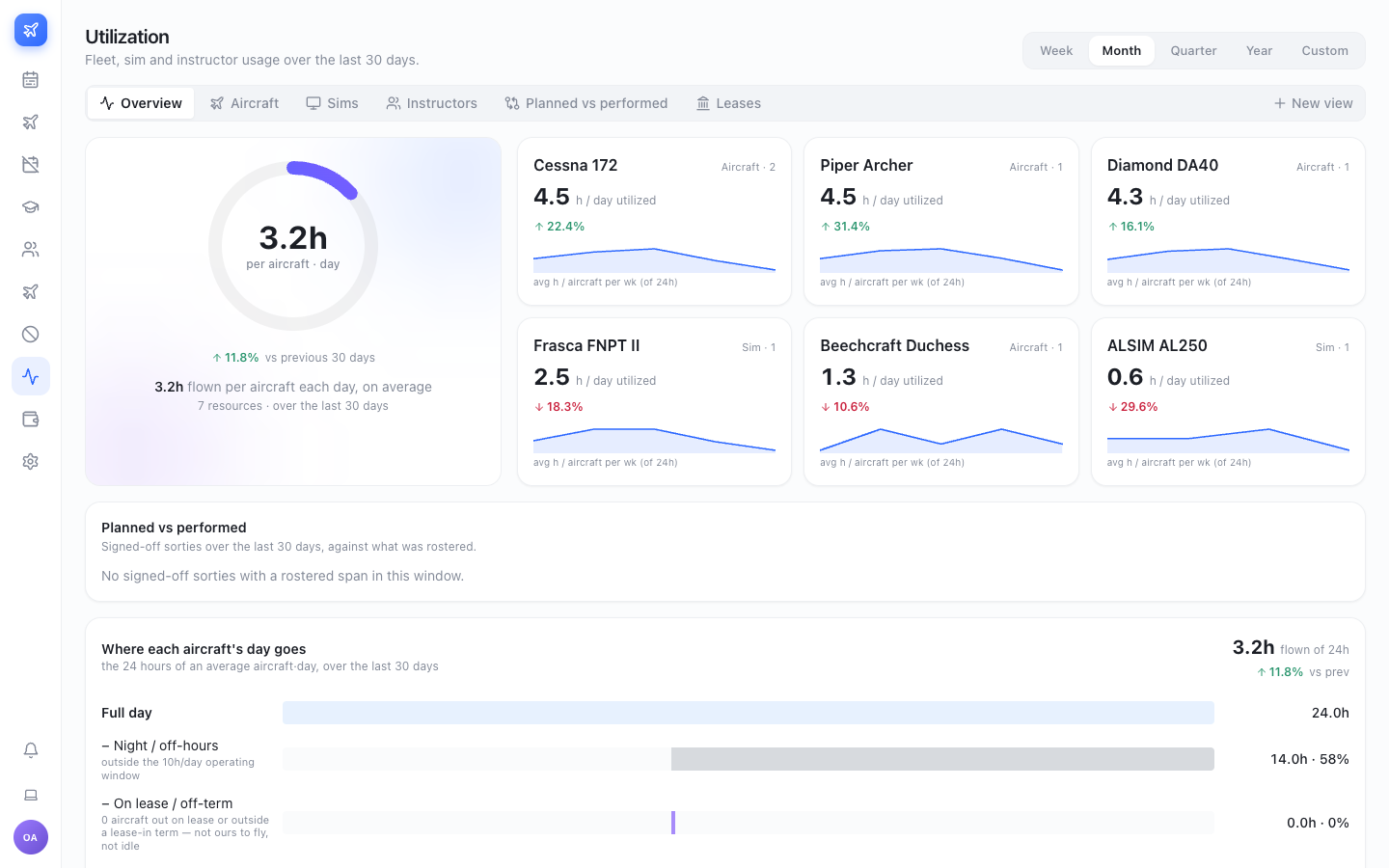
Cadets see their next sortie, their progress and their logbook. Instructors see their day and the sign-offs waiting on them. Dispatch runs the control centre. Leadership sees utilisation and the numbers behind it. One record underneath, with a role-based login for each, on phone or desktop.

The FlightQ cadet portal on a phone: the next sortie with its time, instructor and aircraft, then course progress and flight time
The FlightQ instructor portal on a phone: today's flights and students, pending sign-offs and the month's calendar
FlightQ · Dispatch board
The FlightQ dispatch board: today's sorties by lifecycle stage, from not checked out to sign-off
FlightQ · Utilisation
The FlightQ utilisation view: hours flown per aircraft per day, each fleet's trend, and where each aircraft's day goes

Sees their sorties, progress, logbook and documentsCan't see other cadets, billing rates, the roster before it's published

Real FlightQ screens · sample school data

Utilization & revenue

Every idle hour is revenue you never get back.
See where the day actually goes.

FlightQ accounts for all twenty-four hours of every aircraft day — flown, outside your operating window, grounded for maintenance, out on lease — and sets what you rostered against what was actually performed, sortie by sortie.

Stop estimating utilization. Start accounting for it.

Most schools quote a number nobody can trace. FlightQ builds it from signed-off sorties, so every hour in the figure has a flight behind it.

  • The 24-hour waterfall: flown, night, maintenance, lease and idle
  • Rostered against performed, by fleet, instructor, tail and simulator

Every cancellation has a cause. Now it has a charge.

A cancelled sortie is a typed, audited record, not a rubbed-out line on a whiteboard.

  • Reasons grouped by schedule, student, instructor and weather
  • Each reason carries its own charge rule and the roles allowed to use it
Utilization overview: hours flown per aircraft per day, every fleet and simulator ranked, and a waterfall showing where each aircraft's twenty-four hours go Planned versus performed: rostered against performed hours by fleet, instructor, aircraft and simulator, with the flagged sorties and why each was flagged Cancellation types grouped by schedule, student, instructor and weather, each with its charge rule and the roles allowed to use it
Utilization · fleet, sim and instructor use over the last thirty days
Batch journey: total hours and flights for the cohort, monthly flight activity, and where every cadet sits across the PPL, IR and CPL milestones Cadet journey: every cadet's hours, flights, weekly average, ground and instrument time, missions completed against the syllabus, and whether they are on track or behind Courses and missions: the syllabus itself, as course, milestone and mission
Batch journey · the whole cohort's hours, flights and milestones
Cadet progress

See the progress behind the hours.

Hours flown is not progress. FlightQ tracks every cadet against the syllabus they are actually on — mission by mission, graded, with the exercises they had to repeat.

  • Batch journeyCohort hours, flights and milestone completion, month by month.
  • Cadet journeyHours, weekly average, missions flown and milestone, on track or behind.
  • Courses & missionsCourse, milestone and mission, from a reusable mission library.
  • Exercise gradingSatisfactory or repeat, recorded on the sortie and carried into the logbook.
Dispatch & the record

Nothing is billed that was not flown.

Checkout, check-in and sign-off happen in order, enforced on the server. The meter reading that closes a flight is the one that writes the logbook, and the one the invoice is built from — so the three can never drift apart.

  • The dispatch chainNot checked out, checked out, checked in, sign-off pending, completed.
  • Dispatch sheetThe paperwork for the sortie, signed on the last page, on one sheet.
  • The logbook writes itselfFrom sign-offs, in all three places, with simulator time marked.
  • The charge follows the contractPriced by the agreement that was live on the day it flew.
The flights table: every sortie in a date range by where it sits in the dispatch chain, with its cadet, instructor, aircraft, activity, stage and dispatch sheet The agreement timeline and rate cards: base rate, airline contracts, batch and student overrides, each bounded by the dates it was live
Flights · every sortie, by where it sits in the dispatch chain
For leadership

Every tail you operate, measured the same way.

Aircraft and simulators measured against the same benchmark, so you can see which tail is earning its keep and which is sitting idle, and take that into your next lease, purchase or disposal decision.

Fleet scorecard

Last thirty days · aircraft and simulatorsAll fleets
VT-ABCCessna 172 · 66 sorties
Working hard
Hours flown per day5.1h
Performed vs rostered+2.8%
Sorties flown66
Fleet Cessna 172 · 2 aircraft
VT-PQRPiper Archer · 57 sorties
On pace
Hours flown per day5.2h
Performed vs rostered+7.2%
Sorties flown57
Fleet Piper Archer · 1 aircraft
VT-DCHDuchess · 17 sorties
Underused
Hours flown per day1.1h
Performed vs rostered+2.4%
Sorties flown17
Fleet Beechcraft Duchess · 1 aircraft
  • Fleet viewEvery aircraft and every simulator in one place, for the people who sign for them.
  • Ranked against its own fleetEach tail measured against its fleet's average, not one number for the whole ramp.
  • Owned and leased alikeThe same metrics whether you own the aircraft or lease it in.
Utilization by aircraft: every tail ranked by hours flown per day against its own fleet's average Utilization by instructor: duty load per day beside first-time pass rate, with deviation bands and budget buckets you define
By aircraft · every tail against its own fleet's average
Traceable by design

Ask any number why.

Nothing on a FlightQ screen is typed in. Every figure is built from signed-off sorties, so you can open it and get the flights behind it — the tail, the crew, the times, and why it was flagged.

  • Every figure drills downOpen a deviation and the sorties behind it are listed, worst first.
  • Four angles on the same monthBy fleet, by tail, by instructor and by simulator.
  • Bands and buckets you defineYour own thresholds and ranges, not someone else's idea of normal.
  • Effort beside qualityInstructor load sits next to first-time pass rate, so neither hides the other.
One shared record

Every role works in the same record.

A cadet checking tomorrow's sortie on a phone, an instructor signing off beside the aircraft, a dispatcher releasing the day — all writing to one record. Nobody has to ask anyone for the latest sheet, because there is only one.

Chief instructor & adminThe whole school, every module, every batch.
RosterersBuild the day, clear the conflicts, send it to review.
DispatchersRelease the aircraft, take it back, accept the sign-off.
InstructorsTheir flights, their cadets, their grades and remarks.
CadetsTheir own sorties, hours and documents, on a phone.
People: everyone at the school with their role, login and detail, filtered by admin, dispatcher, instructor, rosterer, student or superadmin Rooms and duties: briefing rooms, the dispatch desk and the parts room, and duties such as duty flight instructor, fuelling, safety and scheduling The control centre's publish state: all sorties, those in planning, those in review and those published
People · everyone at the school, with the role they hold
Cancellation types: each reason carries its charge rule and the list of roles allowed to use it Organisation settings: the timezone the control centre's today and now-line are measured against, and where a half day splits
Cancellation types · each reason names the roles allowed to use it
Trust & governance

The right access for every role. A day you can prove you published.

Rules are enforced on the server, not in the browser. Publishing a day takes a snapshot of it, so months later you can still show exactly what the flight line was told to fly.

  • Published snapshotsEvery release of a day is kept, so what the flight line saw is never in doubt.
  • Role-based permissionsSix roles, each seeing and doing only what it should.
  • Enforced on the serverThe checkout chain and conflict rules hold even if the browser is bypassed.
  • Documents served safelyAn uploaded file cannot run script on your origin.
  • One timezone for the schoolToday and the now-line follow where the school actually operates.
Getting started

Start from the roster you already keep.

We bring in the fleet, people and syllabus you already have on paper, then set up your rooms, duties, rate cards and roles with you.

Bring in what you have

Your fleet list, your people and the syllabus you already fly.

Set your rules

Operating window, duty limits, cancellation reasons and what each one charges.

Invite the flight line

Rosterers, dispatchers, instructors and cadets, each with the right access.

The whiteboard used to decide our day. Now the day is decided before anyone gets in, and the invoice at the end of the month agrees with the logbook.Chief Flying Instructor · Partner flight school
Sample quote
Next step

Run your entire flight school from one platform.

In a short briefing we map your fleet, your courses and your contracts to FlightQ, and show you the control centre, the utilization and the billing with a school set up like yours.